

For FMCG distributors with vans and salesmen
Sales happen every day. So where is your money stuck, and where is your stock going?
Mulberry Sales answers both every evening, on your phone: what each salesman billed and collected, which shop owes you and since when, and what is left on every van.
No card for the trial. Nothing to install. One price for the whole business, not per salesman. See prices
Watch how setup works (1 min 50 s) (opens YouTube)All how-to guides and videos
Don't just see that money is short. See which bill and which shop.
Today's close
ExampleYour screen when the vans come back.
Billed
₹41,280
In hand
₹36,900
On credit
₹4,380
Billed
₹33,150
In hand
₹30,650
On credit
₹2,000
Not accounted for · bill V2-0419 · Sri Lakshmi Stores₹500
Billed
₹38,740
In hand
₹38,740
On credit
—
Billed today
₹1,13,170
Money in hand
₹1,06,290
Vans back
3 / 3
Van stock
“I can keep track of the stock loaded into the van, what gets sold, and what comes back at the end of the day. Earlier, keeping these details organized was a bit of a headache.”
Billing
“I can create bills without struggling through complicated screens, which is especially helpful when there are multiple customers waiting.”
Payments and dues
“It makes managing customer accounts more systematic and reduces my dependence on scattered notes.”
- 14 days free, no card
- Monthly plan: money back in 7 days
- Stop with 3 days notice
- Your data out in Excel, any time
Sound like your business?
What is costing you money today?
Find your problem below. Each one is in a distributor's own words, with what changes and how you can check it yourself before paying anything.
- Don't know what sells and what's stuckGodown and van stock as it moves, sales by productSee how ↓
- Damaged, expired and unsold stockVan counted back in, damage at cost, expiry warningsSee how ↓
- My software doesn't cover the roadKeep Tally, Vyapar or Marg; Mulberry runs beside itSee how ↓
- Salesmen don't cover their shopsA shop list for each day, clock-in times, live mapSee how ↓
- Retailers pay late, or neverEvery rupee on a bill, oldest dues first, hold on new billsSee how ↓
- Company wants cash, shops want creditCredit limit on every shop, balances by ageSee how ↓
- Going back to the same shop for moneyDues on the salesman's phone, collected at the doorSee how ↓
- Wholesaler wants a deeper discountReal profit at cost; prices change only with your OKSee how ↓
- Company sends more than the market takesReal sales by product, ready for the order meetingSee how ↓
- Everything is a messOne app for the salesmen, one screen for youSee how ↓
Problem 1
“I don't know what is in stock, what is selling and what is stuck.”
What changes
Stock in the godown and on every van, as it moves. Opening, closing and current stock for each day on your dashboard. Sales by product, shop and salesman for any dates, and a list of what has not sold for weeks.
The proof
Stock drops when a bill is made on the phone, not when someone types it in the evening, so the numbers are already right when you look.
Reports: Growth plan and up · “Not selling” alerts: Business planHow to find the stock that is stuck →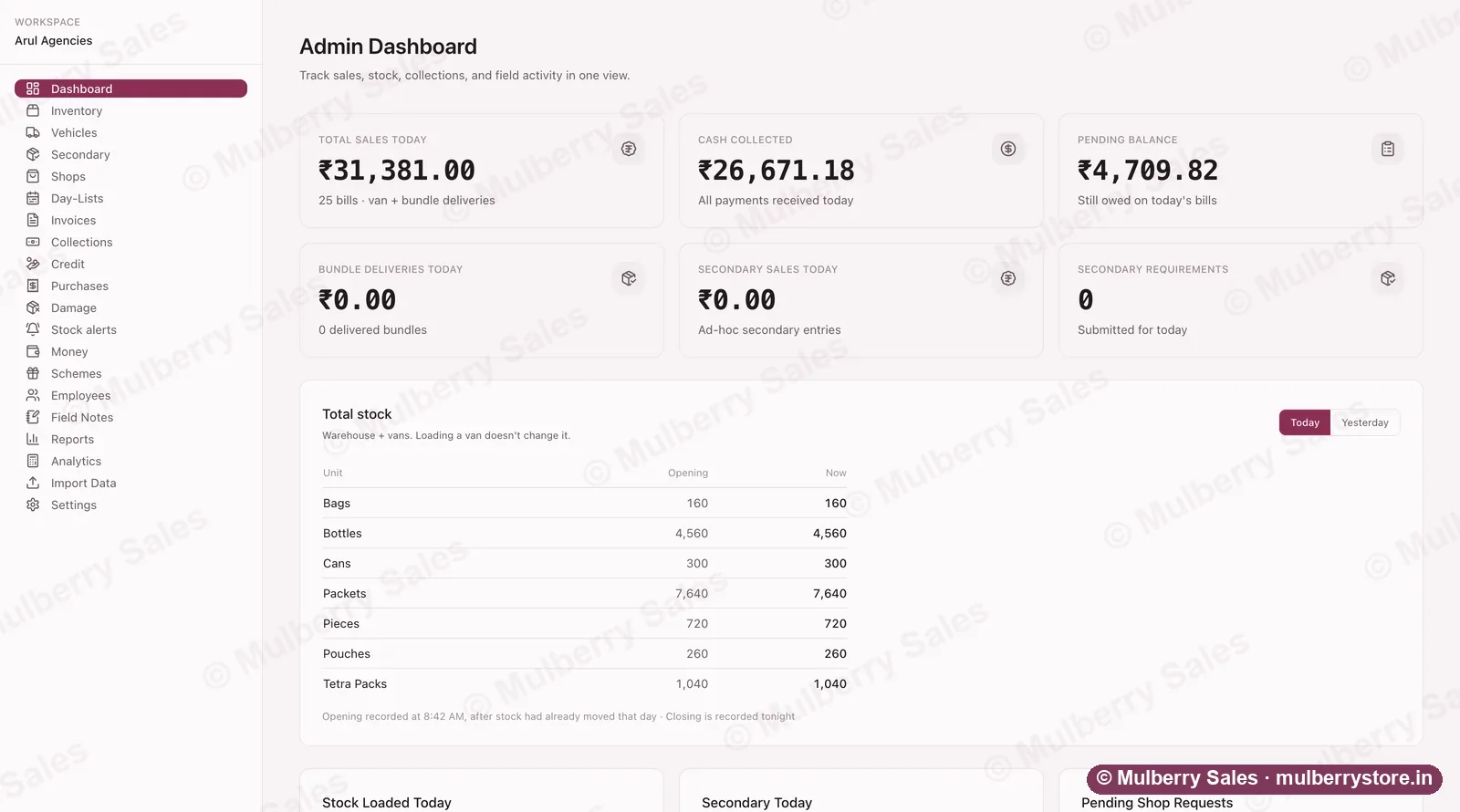
The day at a glance, while the vans are still out.Demo workspace — every shop name and figure is invented. Problem 2
“Damaged, expired and unsold stock ends up as my loss.”
What changes
Unsold goods come back into stock when the van unloads. Broken or expired goods are written off at what they cost you, so the loss shows in the day's profit instead of vanishing. Add an expiry date on a purchase bill and you are warned before those goods expire, with how much is still on hand.
The proof
The expiry date is optional. Goods with a date are watched; goods without one are never reminded about, so you are not flooded with alerts for soap.
Damage write-off: Growth plan and up · Stock alerts: Business planHow to stop stock losses eating your margin →Loaded on the van
leaves the godown count
Sold on bills
Unsold comes back
back into stock at night
Broken or expired
written off at cost
Every piece that leaves in the morning is accounted for at night. Problem 3
“My billing software is fine at the counter, but it has no idea what happens once the vans leave.”
What changes
Keep Tally, Vyapar, gPro or Marg for counter bills, GST and accounts. Mulberry runs beside it for the road: stock loaded on each van, bills on the salesman's phone with or without signal, money taken shop by shop, credit, and what comes back in the evening.
The proof
Nothing is typed twice: your shops and products come in from the lists you already have, and the day's sales go to your accountant as an Excel file. Mulberry does not post bills into your billing software by itself yet — we would rather say so here than after you sign up. What stays and what Mulberry takes ↓
Check it yourself: in the trial, bill three shops from the phone, then download the day's sales as Excel and lay it next to your day book.
Excel exports: Growth plan and upTally for FMCG distributors: what to add for the vans →Problem 4
“My salesmen don't visit enough shops, and I have to keep pushing them.”
What changes
Give each weekday its own shop list, so the route is decided before anyone leaves. His day starts and ends on his phone with the time, and every bill shows which shop was billed and when. A live map shows where each clocked-in salesman is.
The proof
The map shows only salesmen who are clocked in, and only where they are now, not a replay of their day. Pitch it to your men as protection, not spying.
Live map: Growth plan and upHow to check the work without spying →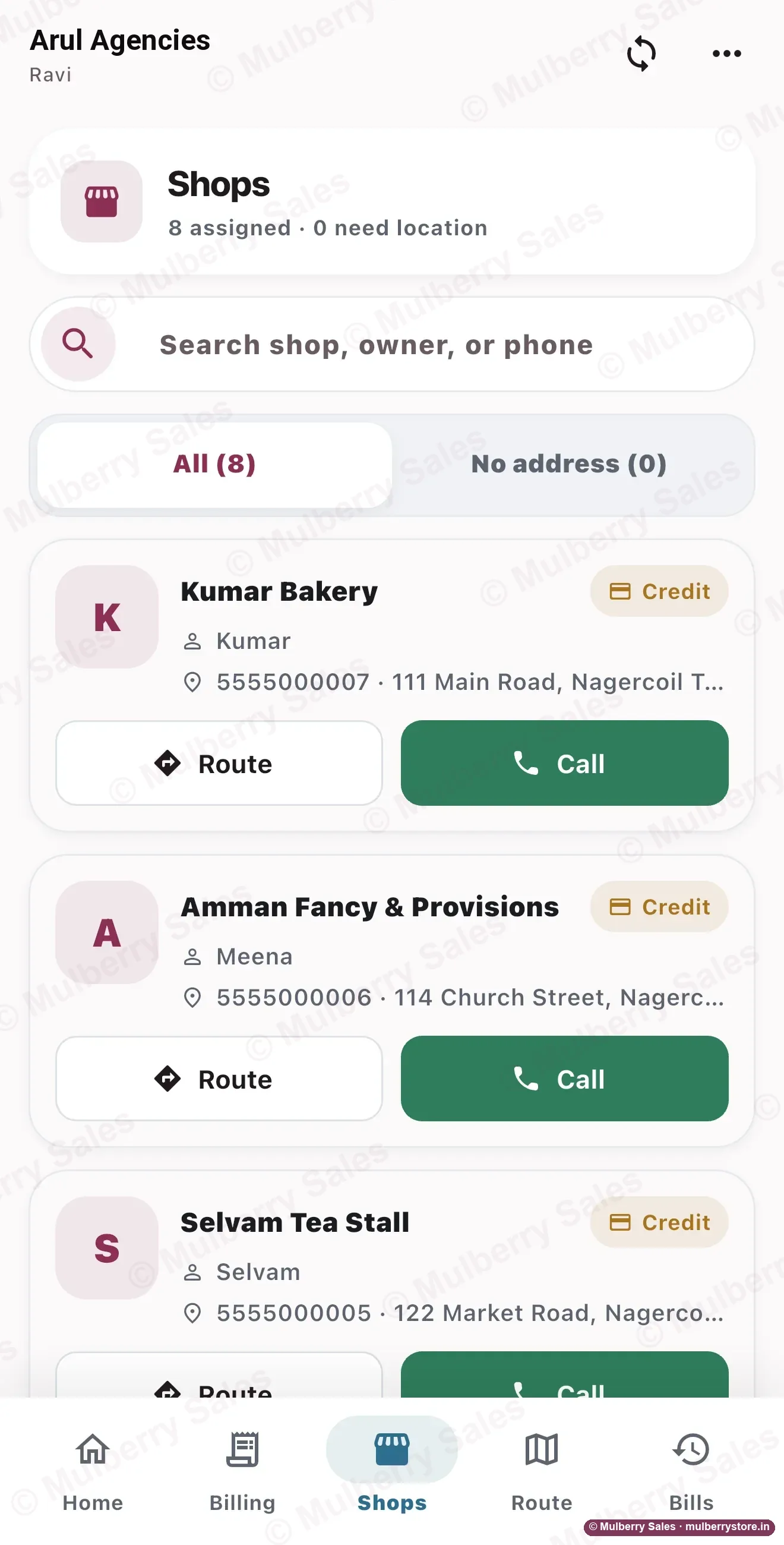
Today's shops, route and callDemo workspace — every shop name and figure is invented. Problem 5
“Retailers pay late. Some never pay at all.”
What changes
Every rupee sits against a bill, and the shop gets the bill on WhatsApp showing what was paid and what is left. The oldest dues rise to the top, so you phone the right shop this week, not in March. A shop that goes too far can be put on hold for new bills while your man keeps collecting.
The proof
A payment cannot be edited later and a bill cannot be deleted, only reversed with the reversal on record. “I already paid you” is settled by the bill, not by two memories.
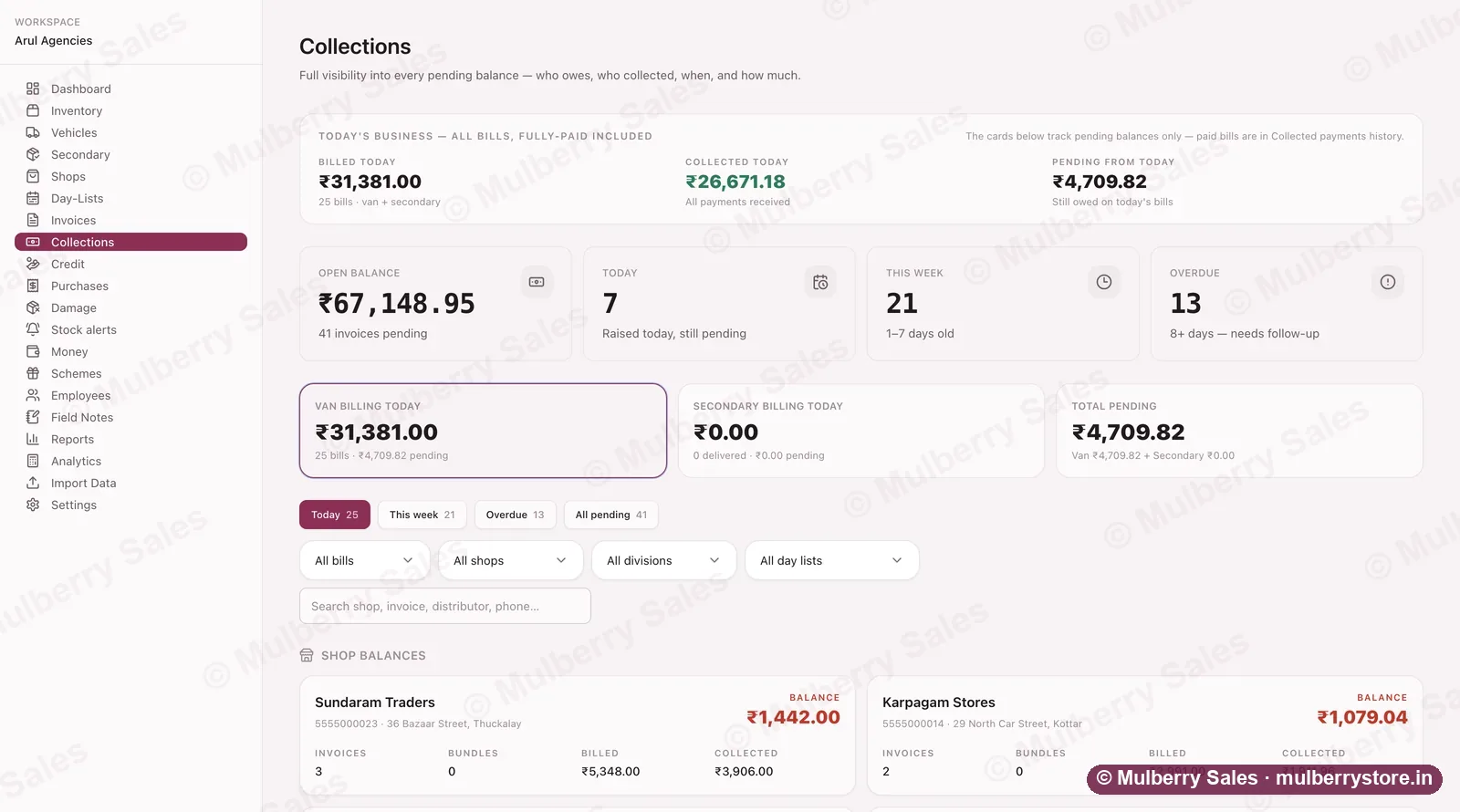
Collections: today's bills, what came in, and who still owes — shop by shop.Demo workspace — every shop name and figure is invented. Problem 6
“The company wants payment now. The shops want credit.”
What changes
See every shop's balance split by age: this week, last week, this month, older. Give each shop a credit limit, and a bill that would cross it is stopped on the salesman's phone. Your money stops quietly funding other people's shops.
The proof
The limit is checked on the phone and again on our server, so it cannot be skipped by an old app or a quick tap.
Check it yourself: set a ₹5,000 limit on a test shop in the free trial and try to bill ₹6,000 on credit.
Approve one bill over the limit with a code: Business planHow to stop being squeezed from both sides →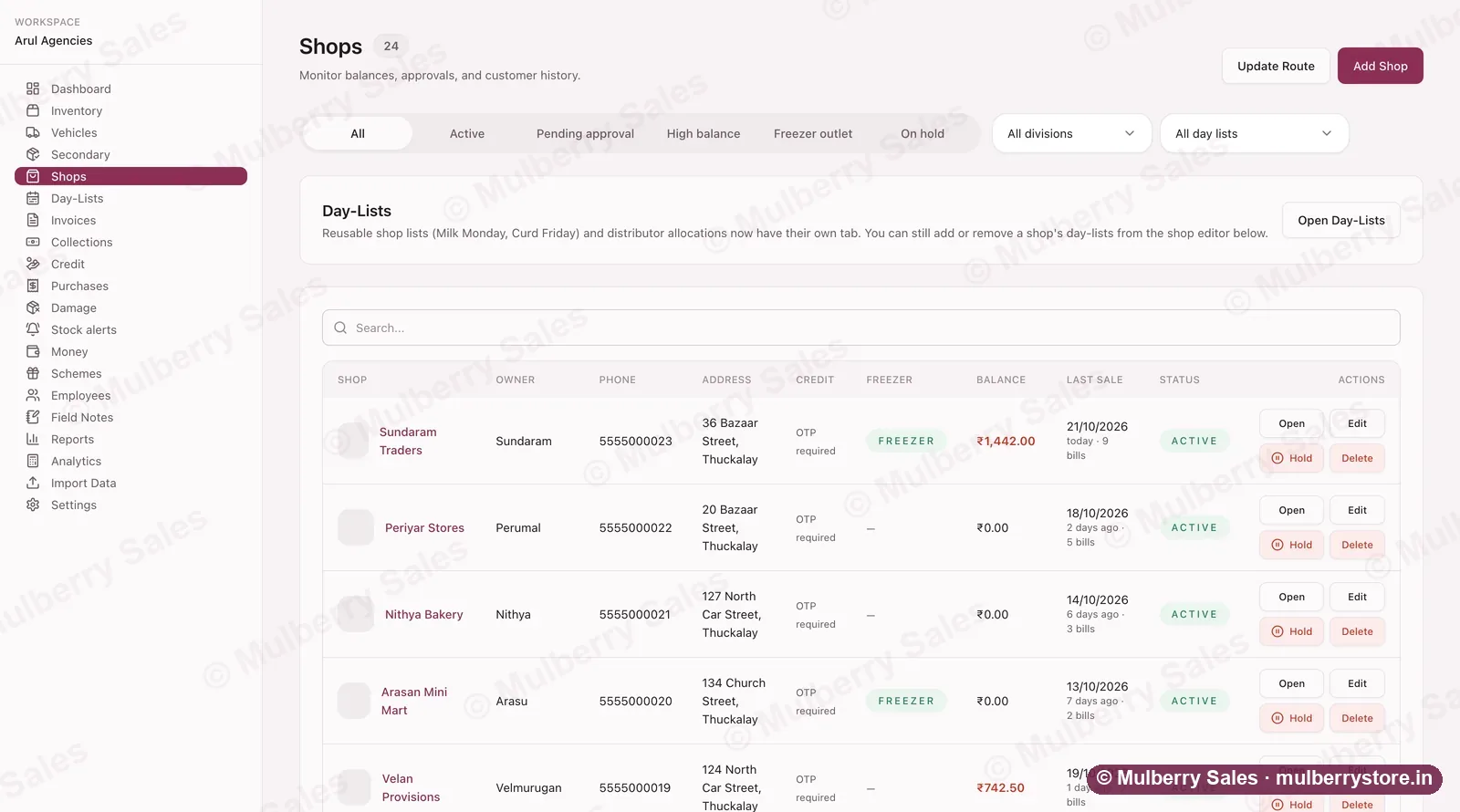
Every shop on your beats — balance, last sale, and a Hold button when the credit runs too far.Demo workspace — every shop name and figure is invented. Problem 7
“Collecting money means going back to the same shop again and again.”
What changes
Your salesman's phone shows what every shop on today's route still owes. He collects at the door, in full or in part, against the right bill, with cash and UPI kept apart so the evening count is quick.
The proof
The screen on the right is the salesman's own collection screen, from a demo workspace.
On the salesman's phone: Starter plan and up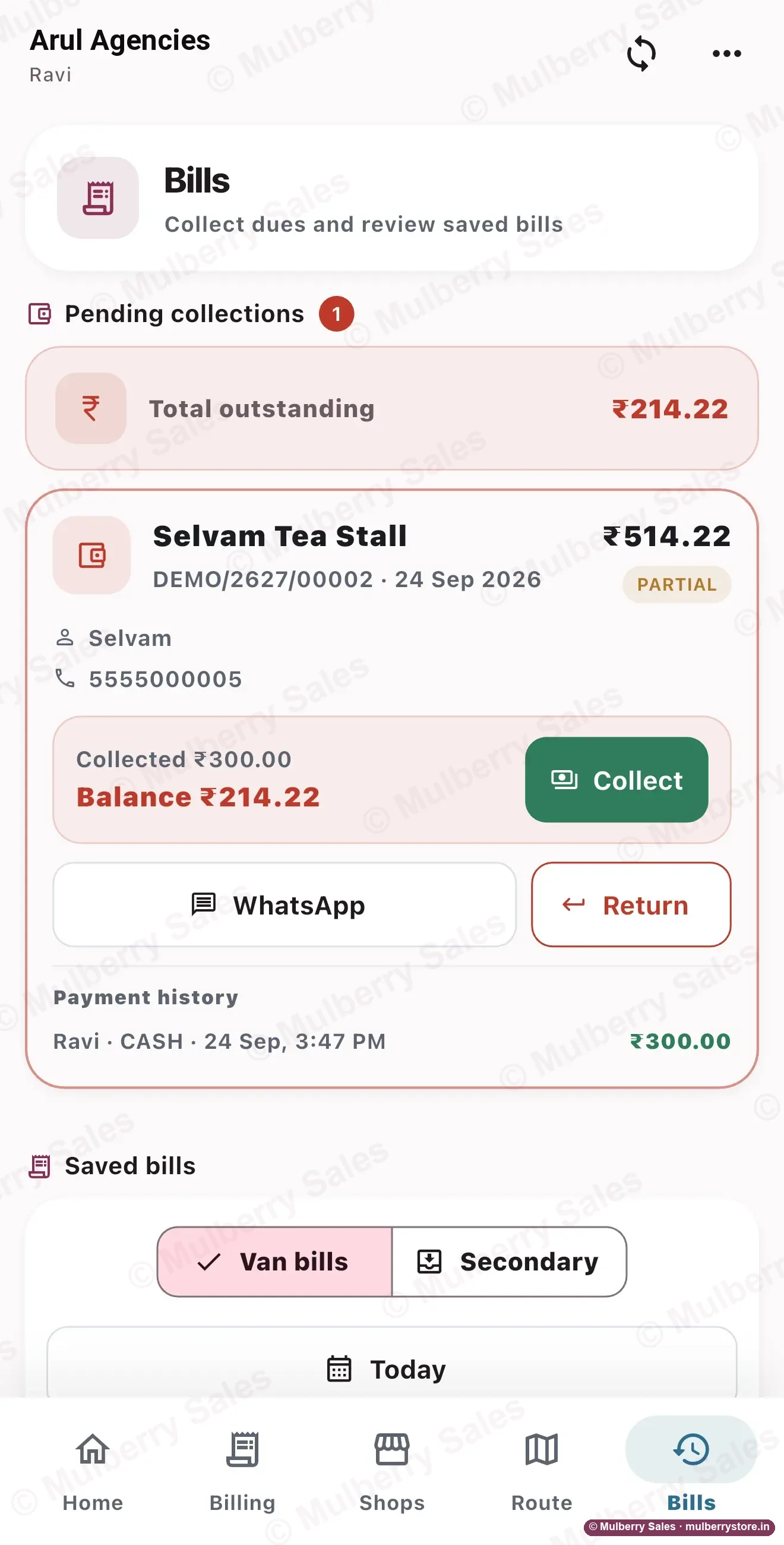
Old dues, collected at the doorDemo workspace — every shop name and figure is invented. Problem 8
“The wholesaler wants a deeper discount. Is anything left for me?”
What changes
Every day closes with real profit, worked out at what each item cost you, not just what you sold. A salesman can change a price only if you allow it, and every discount is recorded shop by shop and man by man.
The proof
The cost of each item is frozen on the bill the moment it is sold, so a later price rise cannot rewrite last month's profit.
Day-end profit: Every plan · Full profit reports: Business planWork out a discount before you give it →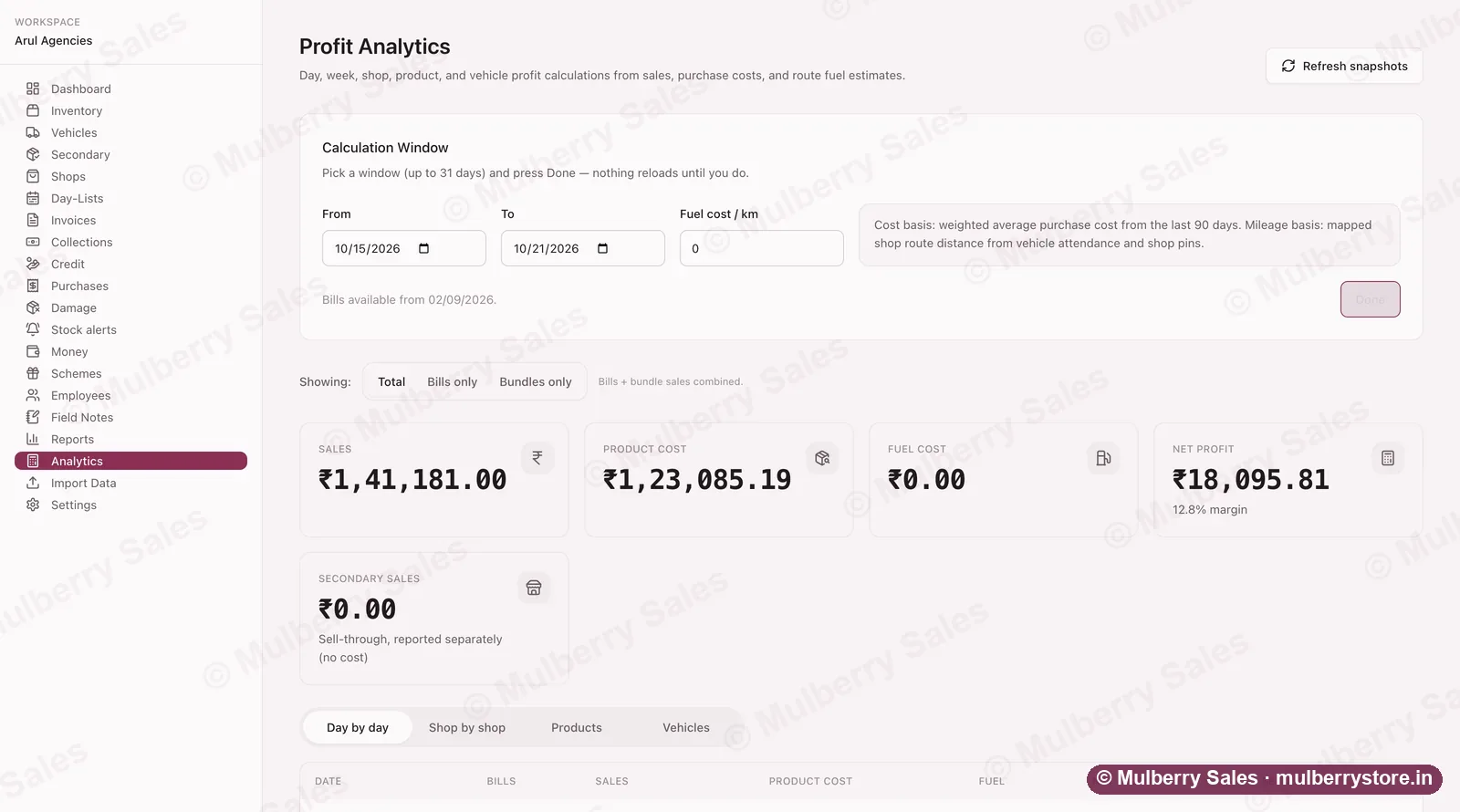
Real profit, at what each item actually cost you — not just what you sold.Demo workspace — every shop name and figure is invented. Problem 9
“The company sends more stock than the market takes.”
What changes
Every bill your men raise is a record of what really sold, shop by shop and product by product. Walk into the company meeting with last month's real sales, and order what moves instead of what they want to push.
The proof
Reports export to Excel in one click, so the numbers you show the company are the same ones your bills made.
Reports and exports: Growth plan and upHow to push back on stock you can't sell →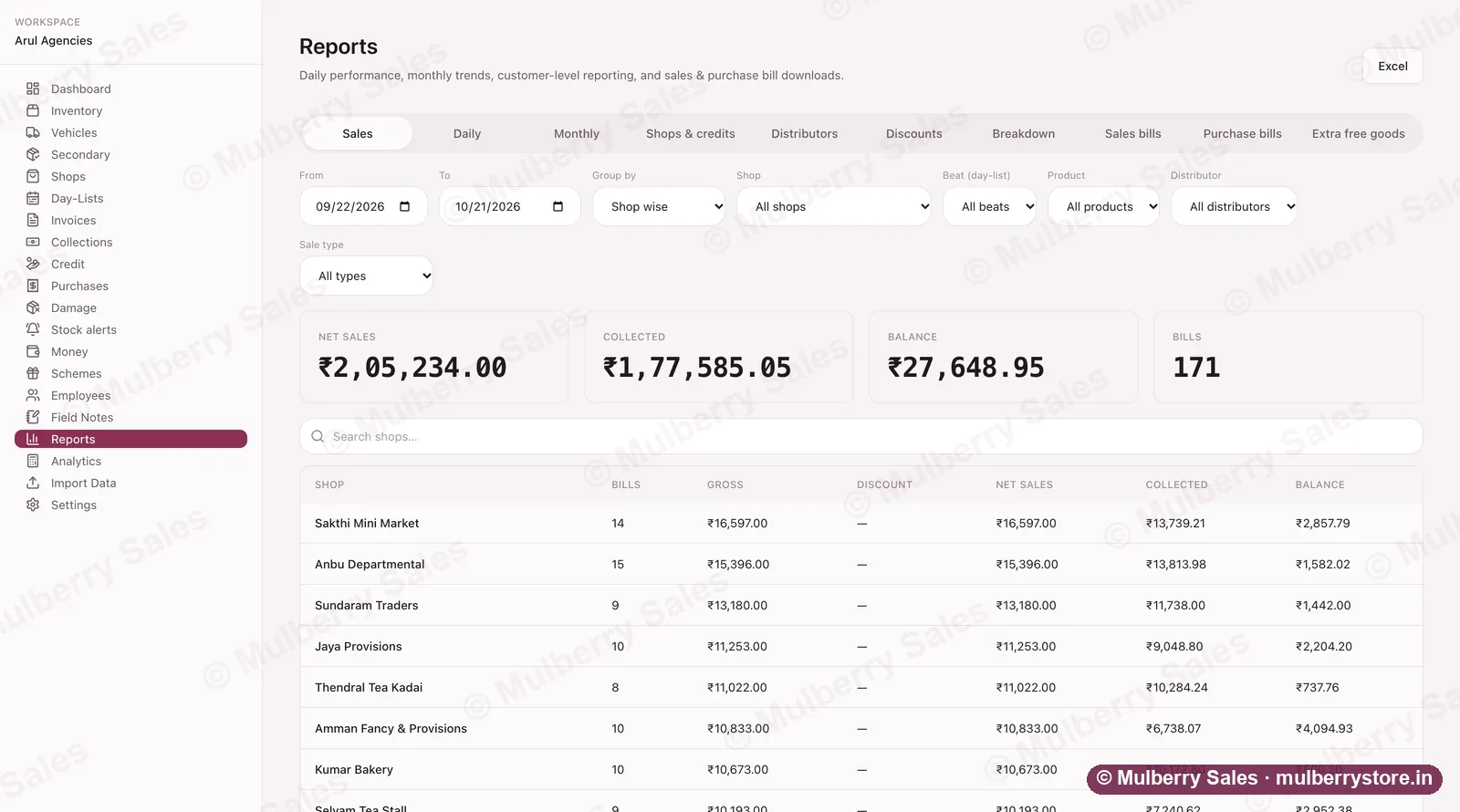
A month of sales by shop, beat, product or salesman — exported to Excel in one click.Demo workspace — every shop name and figure is invented. Problem 10
“Orders, bills, payments, stock, vans, delivery boys: it is all a mess.”
What changes
One app on your salesmen's phones, one screen for you. Load in the morning, bill all day, close at night. Your shops, goods and old dues come across from Excel, so you start with what you already have.
The proof
For the first 5 businesses each month, we put your shops, goods and stock in for you and train your men at your godown.
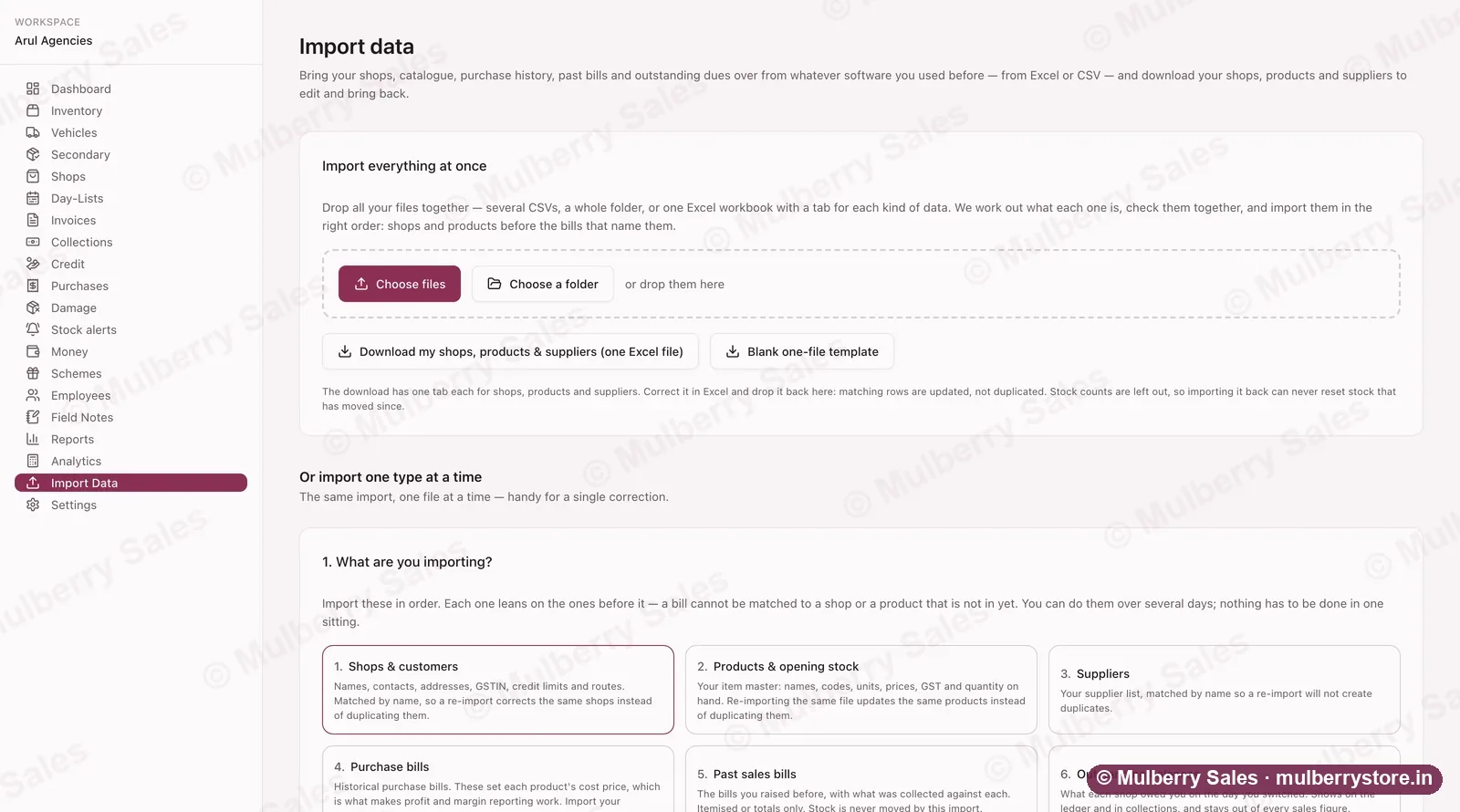
Bring your shops, goods, old bills and dues across from Excel — nothing typed twice.Demo workspace — every shop name and figure is invented.
How it works
A day on it, in three steps.
Morning — load the van
Put in what goes into each van. The same boxes come off your godown stock, so what is on the shelf and what is in the book stay the same number.You or your godown man, on any phone.
Through the day — he bills at the shop
Your salesman bills on his own phone in front of the shopkeeper. He takes cash or UPI, and marks what he is giving on credit. With no signal the bill saves on his phone and sends itself when the signal comes back.On your salesman's phone.
Evening — the day closes
The van unloads and whatever did not sell goes back into stock. The day's total is already made: billed, collected, given on credit, and profit worked out at what each item cost you.On your phone — before he reaches home.
On your salesman's phone
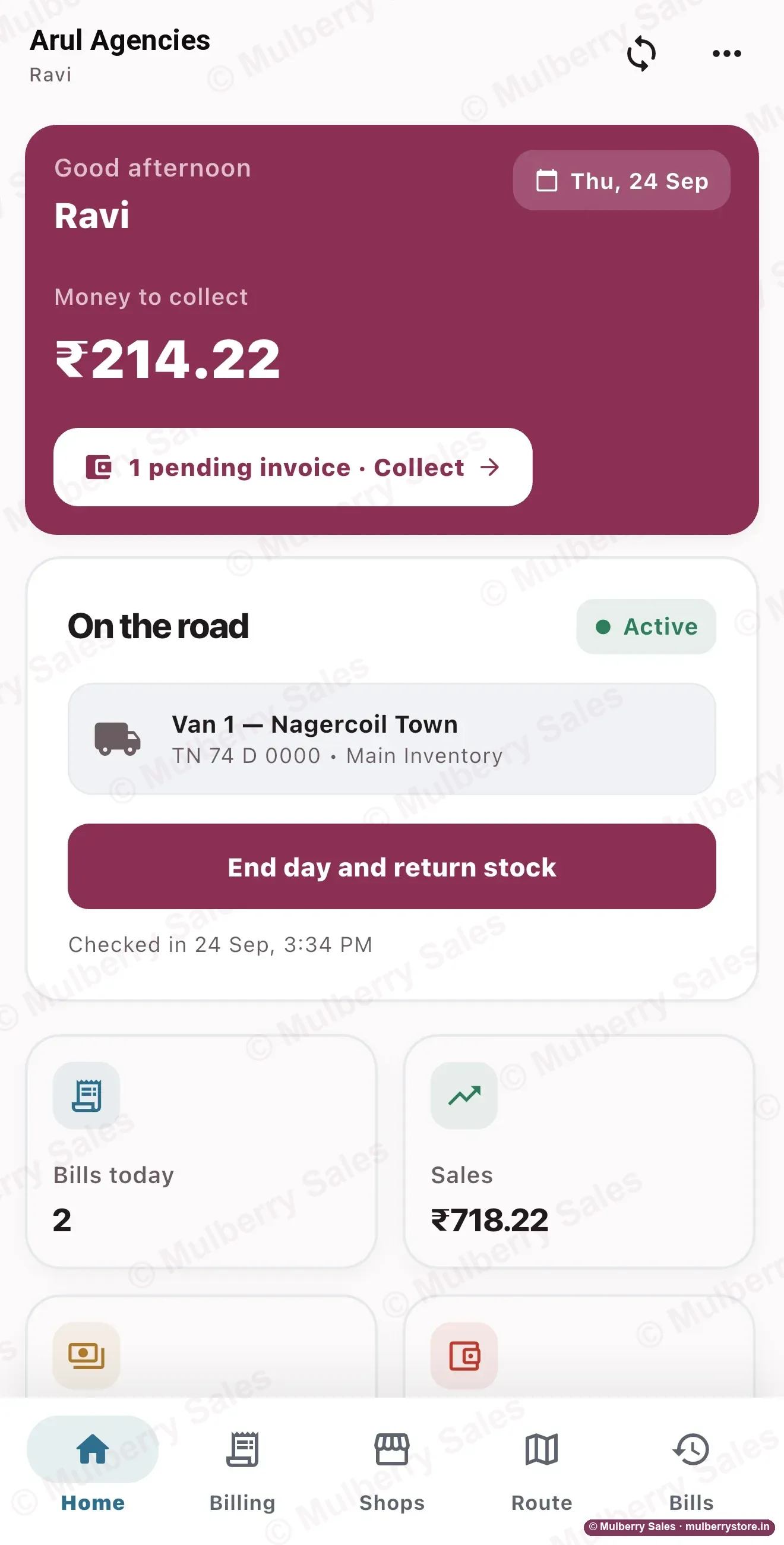
His day, on one screen 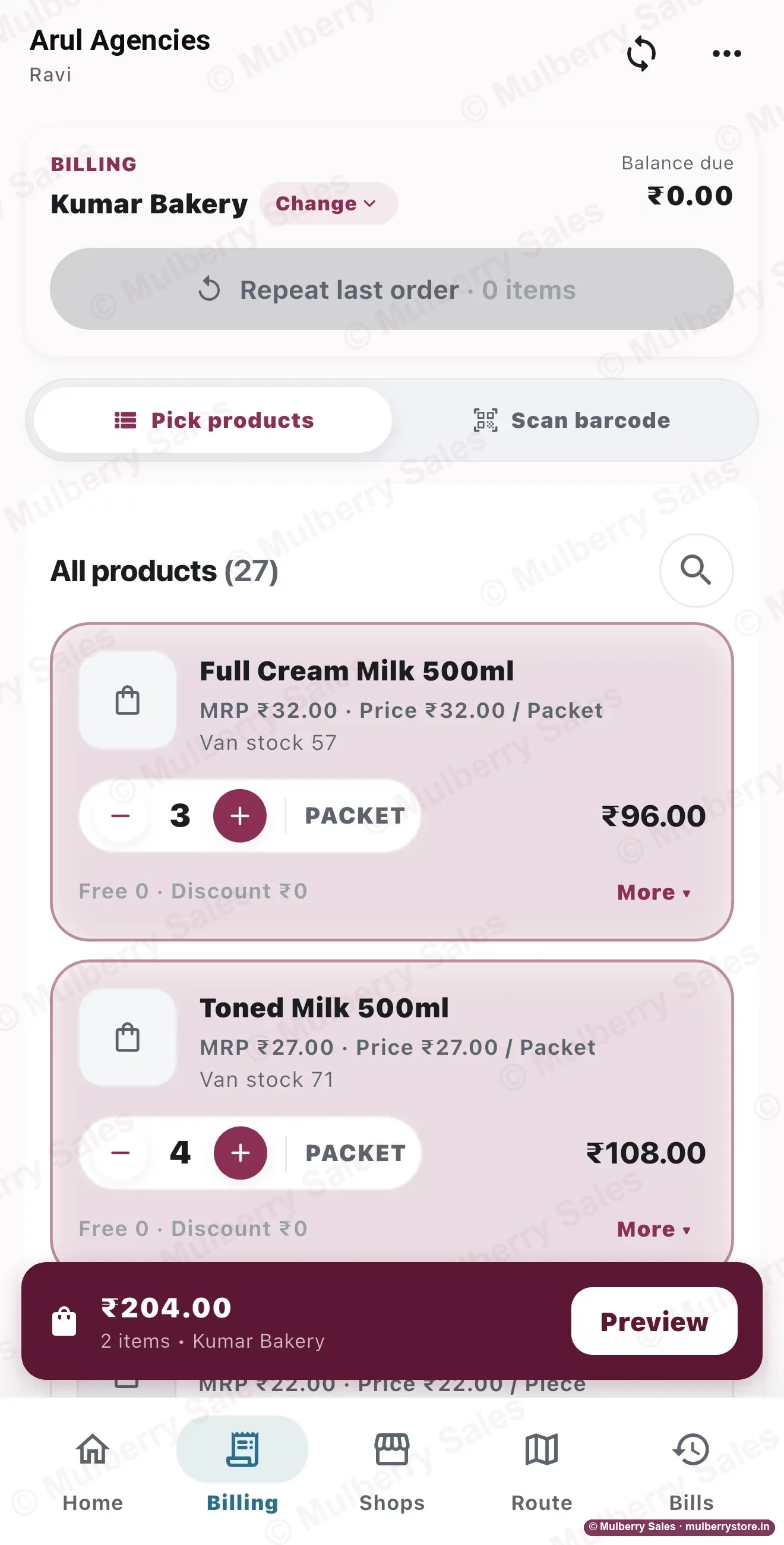
Tap + and −, see van stock 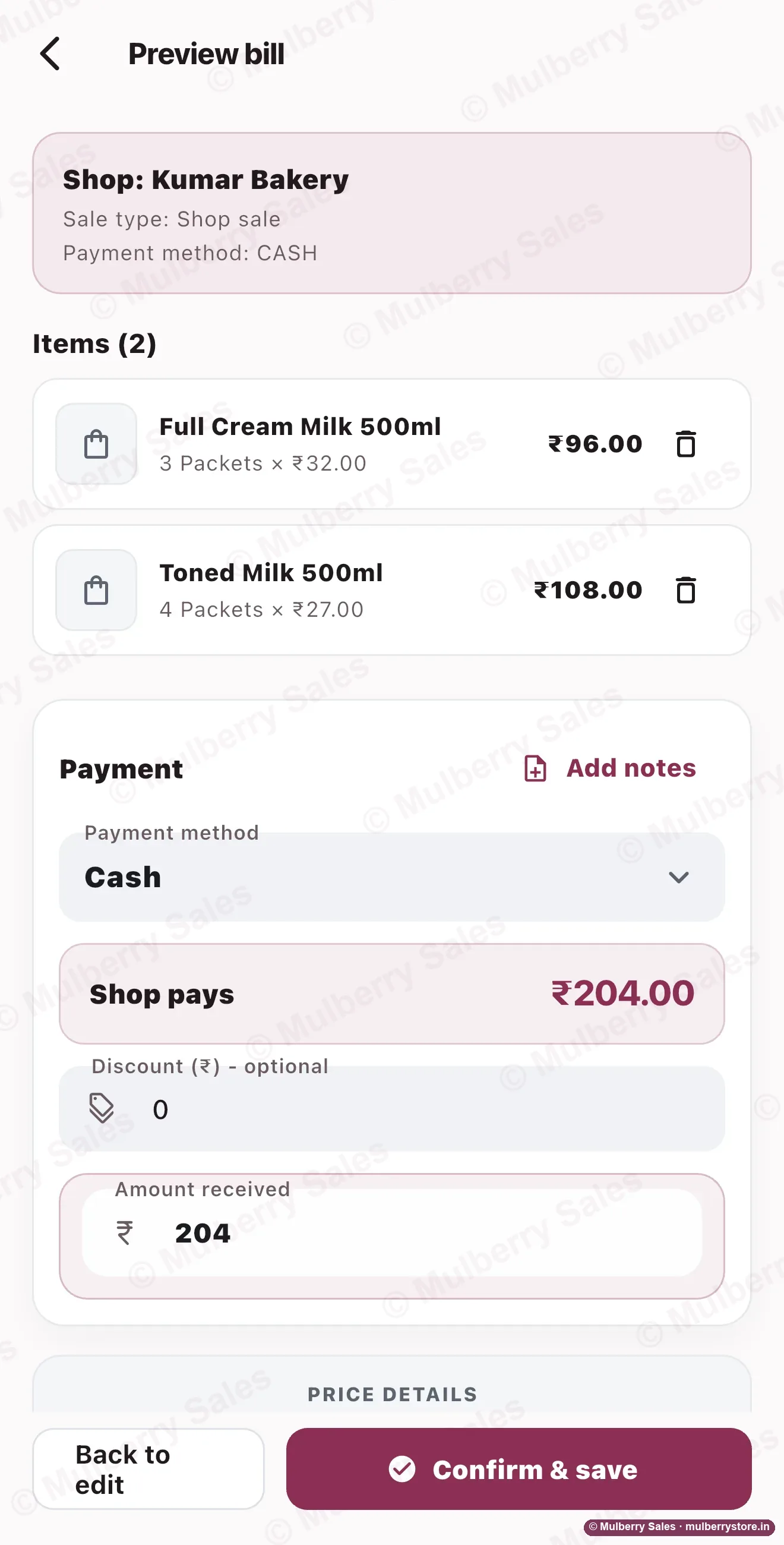
Check it, take the cash, save
Demo workspace — every shop name and figure is invented.
What you get when you start
We do the setup. You run one van and watch.
We set up only 5 businesses a month by hand, so each one gets our full attention in its first week.
- 14 days free. No card, nothing to install.
- Your shops, goods and stock put in for you, from your Excel or notebook (first 5 businesses each month).
- Your salesmen trained at your godown, on their own phones.
- One price for the whole business. Add salesmen up to your plan and it stays the same.
- Billing works with no signal, and sends itself when the signal comes back.
- Your data stays yours: export to Excel any time, back up to your own Google Drive.
- Not for you? You get 14 days free to try it with your own team before paying anything, so the one-time ₹44,999 setup fee is not refundable. Your first monthly plan payment is refundable within 7 days.
After 14 days, compare your numbers
Keep your notebook or your old software running beside it. On any evening, put the two side by side.
| What to compare | Your current way | Mulberry |
|---|---|---|
| Cash each salesman should hand over | What he says, or what the notebook adds up to | Worked out from his bills, UPI kept apart |
| Credit given today, and to whom | Whatever got written down | Every credit bill, by shop and salesman |
| Stock that did not come back | Found at the month-end count | Named by product, the same evening |
| What the day really earned | Sales, not profit | Profit at what each item cost you |
If Mulberry did not show you something you could not see before, don't pay. You won't have given us a card.
Keep what you use
Keep your billing software. Mulberry takes the road.
Tally, Vyapar, gPro, Marg or Busy do your counter bills and accounts. Mulberry looks after what happens after the vans leave.
How it works with your billing software →- Van bills, with or without signal
- Money taken, shop by shop
- Credit only when you say yes
- Van stock, out and back
- The day closed with real profit
Count it yourself
Work out what the leak costs you in a month.
Pieces that never reached a bill, money that never came back, damage nobody wrote down. Put in your own numbers — this is your arithmetic, not our claim.
₹2,499 a month — under ₹21 every 6 hours for the whole business, plus ₹44,999 one-time setup.
Why the bill does not grow
One price, however many salesmen you hire.
| What you pay for | Most van sales apps | Mulberry Sales |
|---|---|---|
| How the price works | Per user, per van or per device, every month | One price for the whole business |
| 25 salesmen, 12 vans | 25 times the per-user price | ₹3,999 a month, after a one-time ₹44,999 setup |
| Price on the website | Usually hidden — ask for a quote | Printed on the price page |
| Putting your data in | A paid service, or your own job | Free for the first 5 businesses each month |
| Who answers you | A call centre or a dealer | The person who builds it, on WhatsApp |
The prices other Indian tools publish are on our price page, each with the date we checked it. We never say a competitor is bad — only what each one charges.
From distributors running it
What it changed, in their words.
“The van stock management feature is really useful for my daily operations. I can keep track of the stock loaded into the van, what gets sold, and what comes back at the end of the day. Earlier, keeping these details organized was a bit of a headache. Having everything recorded in one place makes the whole process much easier.”
Parvathi Agency
On the Business plan
Aranthangi
“What I like about Mulberry Sales is how straightforward the billing process is. I can create bills without struggling through complicated screens, which is especially helpful when there are multiple customers waiting. It makes daily billing feel more organized and saves me from unnecessary confusion.”
Sameer Agency
On the Business plan
Mumbai
“Keeping track of customer payments and outstanding balances is very important in distribution. I find it helpful to have this information available in the system so I can review what has been collected and what still needs follow-up. It makes managing customer accounts more systematic and reduces my dependence on scattered notes.”
Kumar Enterprises
On the Growth plan
Nagercoil
Before you move your business
Check it against your own books first.
A careful distributor tests before he moves. Run these in the 14-day trial with your real shops and products, while your old book keeps running beside it.
Stock
Cash
No signal
Live map
Reports
Your data
When billing stops: WhatsApp us. Monday to Saturday, 9:00 am to 7:00 pm IST, usually within 4 working hours, and anything that stops you billing is treated as urgent, whatever the hour.
Ask about a testLive map, Excel reports and Drive backup: Growth plan and up. The free trial includes them.
Before you try it
Three things this does not do.
It is not accounting software
It is not fully offline
It cannot fix a rule nobody follows
Questions distributors ask first
The answer is in the first line. No hunting.
How much does Mulberry Sales cost?
₹299 a month for counter billing, ₹1,799 for 2 vans and 3 salesmen, ₹2,499 for 5 vans and 5 salesmen, and ₹3,999 for 12 vans and up to 25 salesmen. Past 25, we quote. That is one price for the whole business, and nothing is added for tax. Every business also pays a one-time ₹44,999 for training and the licence, which includes the first 3 months on Business.
Do I pay more for every salesman?
No. Add men up to your plan limit and the price stays the same. One extra van is ₹200 a month, up to 25 vans on Business.
Does it work without internet?
Yes, for billing. A bill saves on the phone and goes on its own when the signal comes back. Reports and setting up need internet.
Will it warn me before stock expires?
Yes, if you type an expiry date on the purchase bill. Those goods are watched and you are warned before the date, with how much is still on hand. Goods with no date are never reminded about. Stock alerts: Business plan.
Can I keep Tally, Vyapar or gPro?
Yes. Keep your counter bills and accounts where they are. Mulberry looks after the road, and gives your accountant a clean Excel file.
How long does it take to start?
About a day. We put your shops, goods and stock in for the first 5 businesses each month, then teach your men at your godown.
What if I want to stop?
Tell us 3 days before the next bill. Take everything out in Excel whenever you like. You get 14 days free to try it with your own team before paying anything, so the one-time ₹44,999 setup fee is not refundable. Your first monthly plan payment is refundable within 7 days.
Is my data safe with a small company?
One tap sends a backup to your own Google Drive. A bill can never be deleted, only reversed with a record, and one login works on one phone at a time.
Another question? Ask on WhatsApp — you get the person who builds it.
Run one van on it for two weeks.
If it does not show you something you did not know, walk away.
- 14 days free, no card
- Monthly plan: money back in 7 days
- Stop with 3 days notice
- Your data out in Excel, any time